


Vetted AI Smart Shopping Agent
4.3260.00 Reviews
App Specs
- Version
- 2.27.0
- Updated On
- License
- Free
- Downloads
- 100,000+
- Developer
- Yahoo
- Categories
- Shopping
- Platform
- Android
Screenshots


 Analysis by AppCompare
When I choose a shopping app, I care less about the promise of a perfect deal and more about whether it helps me make a decision without adding another chore. Vetted AI Smart Shopping Agent is Yahoo’s free shopping app, built around AI-assisted product discovery. It may suit someone who wants help narrowing choices, but it is not automatically a replacement for checking a retailer directly. I’d judge it by whether its suggestions and shopping workflow fit the way I already browse.
What I would decide before installing
The practical question is how much guidance you want. If you regularly compare products, revisit items, and lose track of where you saw a promising option, an assistant-style shopping app has a clear purpose. If you already know the exact product and retailer you want, opening that retailer’s own app or site may be quicker. I would treat this as a discovery and decision aid, not as a reason to stop checking the final listing before buying.
It is aimed at everyday shoppers rather than a narrow hobby or specialist market. That makes it potentially useful for varied errands, from replacing a household item to comparing a few possible gifts. The trade-off is that broad shopping help depends on the app being relevant to the particular item and the way you shop. I would start with a purchase where I have some flexibility, rather than relying on it for a time-sensitive or highly specific order.
Getting Started with Vetted AI
First off, setting up the Vetted AI Smart Shopping Agent is a breeze. You can download it directly from the App Store or Google Play, and in no time, you’re ready to start shopping smarter, not harder. Once installed, the app asks for a few basic permissions to access your browser and shopping sites, which is pretty standard.
What struck me immediately was how intuitive the interface is. It’s sleek, with a clean design that doesn’t overwhelm you with too much information right off the bat. You’ll find all your favorite shopping sites neatly organized, and setting up your preferences is a cinch.
Where an AI shopping assistant can help
The strongest case for an AI-led shopping tool is not simply finding more products; it is reducing the effort of sorting through them. For a shopper who begins with a need rather than a model number, suggestions can help turn a vague search into a shortlist. I would still decide my must-haves first—such as size, compatibility, or a spending limit—so recommendations are judged against a real need instead of novelty.
A useful way to try it is to compare a few plausible choices, then pause before purchasing and check the retailer’s own product page. Confirm the exact version, seller, delivery terms, and return conditions there. That last check matters because a lower displayed price is not necessarily the better overall purchase if the product variant or terms differ. The app can help organize the search; I would keep the final verification in my hands.
Worth Reading Before You Choose

EA SPORTS FC Mobile 26 Is a Bigger Football Game, but It Takes Time

Flipboard Shows What News Apps Must Do Beyond the Feed

Switching to Android Auto Means Rethinking Your Driving Routine

Google Calendar Makes a Crowded Week Easier to Manage

Ludo King Makes the Most of the Minutes Between Plans

Baby Panda World Brings Quick Play to Modern Phones, but Its Game Library Feels Busy
Features that Stand Out
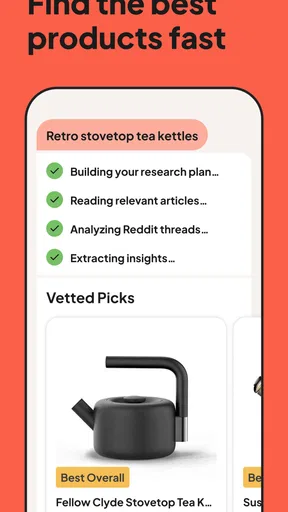
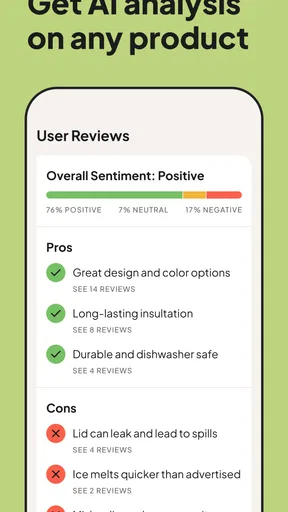
Let’s talk about the app's features because this is where it truly shines. The AI engine behind the scenes is like having a personal shopping assistant who knows your taste better than you do. It curates suggestions based on your browsing history and purchase behavior, offering recommendations that feel tailor-made for you.
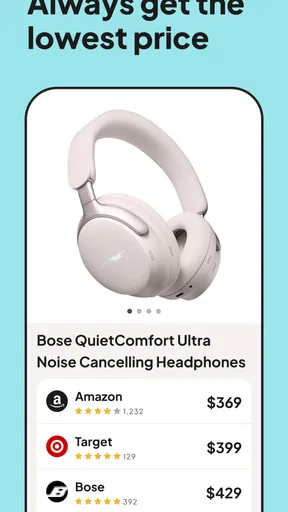
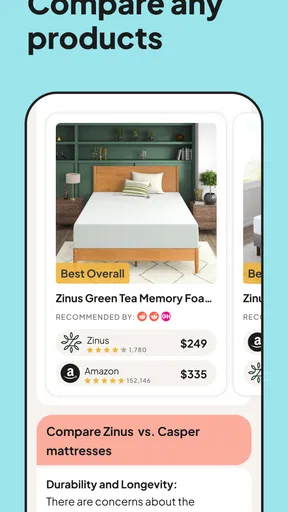
The app also includes a price comparison tool. This feature is a game-changer, allowing you to see if you’re getting the best deal or if another site offers a better price. I’ve saved quite a bit just by using this tool during my shopping sprees.
Another cool feature is the wishlist capability, which helps you track items you’re interested in. Set up alerts, and the app notifies you when there’s a price drop. It’s like having your own little bargain hunter working around the clock.
A more careful way to use recommendations and alerts
I would use recommendations as a starting point, not as a substitute for my own criteria. If an item catches my eye, I would compare it with the features I actually need and make sure the suggested choice is not merely appealing because it is prominent. That small pause is especially useful for discretionary purchases, where a steady stream of tempting ideas can turn “help me choose” into “buy something I had not planned to buy.”
The wishlist is most useful when I give it a job. Instead of saving every interesting product, I would keep a short list for a real upcoming purchase and use alerts to decide when to look again. For instance, if I need a replacement household item but can wait, saving the candidate lets me revisit it later rather than repeatedly searching. An alert is a prompt to check the listing, not proof that the current offer is the best available or that the product still matches my needs.
Price comparisons also deserve a like-for-like check. Before treating one option as cheaper, I would verify that it is the same model and configuration, then consider delivery and the retailer’s terms. This is a small extra step, but it prevents a misleading comparison from making the decision for me. The app’s value is in making comparison easier; the judgment about what counts as a good deal remains personal.
How it fits into a normal shopping day
Imagine I notice that a kitchen item at home needs replacing, but I am not sure which version makes sense. I could use the app to explore options, save a couple that appear relevant, and return to them when I have time. If a price alert arrives later, I can compare the saved choice with its current retailer listing and decide whether to buy or wait. That workflow is more useful to me than browsing aimlessly because each step has a purpose: discover, shortlist, check, then decide.
For a rushed purchase, the same process may be too much. If I already know the exact item and need it immediately, an established retailer or a direct search may get me to checkout with fewer steps. Likewise, someone who prefers to avoid personalized suggestions may find an AI-guided approach less appealing than manually browsing categories. The right fit depends on whether the app reduces friction for you or adds another place to manage shopping.
User Experience
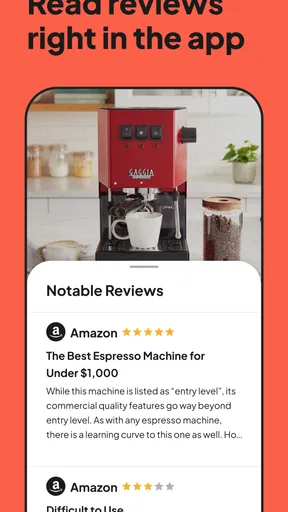
Using the app is as smooth as silk. I love that it integrates seamlessly with my usual shopping habits. Whether I’m on Amazon, eBay, or any other major retailer, the app pops up unobtrusively, offering insights and suggestions without being pushy.
Plus, the app’s customer service is top-notch. Got a question or a hiccup? The support team is just a click away, ready to help. It’s those little touches that make using the app feel reassuring and user-friendly.
Where other shopping options may be better
Compared with manually searching retailer apps one by one, a shopping assistant can make discovery and comparison feel more consolidated. But a retailer’s own app is often the more direct route when I already know what I want, need to review order details, or want to deal with a purchase in the same place I made it. General web search is another reasonable alternative when I want to cast a wide net without adopting another shopping workflow.
There is also a difference between finding a candidate and having confidence in it. For a purchase where fit, compatibility, or seller terms matter a lot, I would not let an AI suggestion settle the question. I would check the exact specifications and the retailer’s details myself. This app is a better fit for reducing browsing effort than for replacing product research that calls for close scrutiny.
Switching does not have to mean abandoning the habits that already work. I would keep using my preferred retailer for checkout and order management, while trying this app for the earlier stage of a purchase: exploring, comparing, and saving possibilities. That low-commitment approach makes it easier to see whether its recommendations are genuinely useful before making it part of every shopping trip.
Privacy, personalization, and practical limits
Personalized shopping can be convenient, but it also asks me to think about how much browsing context I want involved in recommendations. I would review the permissions and choices presented during setup rather than accepting them automatically, and I would avoid sharing more than I need to for the task. If I prefer a fully manual search with no tailored suggestions, a retailer’s standard browsing experience may feel more comfortable.
I also would not assume that every product category will benefit equally. Recommendations are most helpful when I can compare several reasonable options and have room to wait or reconsider. They are less decisive when I have a precise requirement, a complicated compatibility question, or an urgent need. In those cases, targeted research and direct retailer information should take priority over convenience.
The app is free to install, though it offers in-app purchases ranging from $5.99 to $59.99 per item. I would check what an optional purchase includes before spending, and use the free experience first to see whether the core shopping workflow earns a place in my routine. Its Everyone age rating makes it broadly accessible, but that does not change the need for sensible purchasing habits or careful review of each order.
Who should give it a try
I can see the most value for people who browse across several stores, enjoy comparing choices, and want a place to collect possible purchases instead of starting over each time. It may also help anyone who tends to postpone non-urgent shopping and wants a reminder to revisit a saved item. The key is to use the assistant to narrow decisions, not to let a notification create a need that was not there before.
I would skip it if I shop only occasionally and already have a simple retailer routine, if I dislike personalized recommendations, or if I want a specialist tool for detailed product research. It is also not the best answer to every bargain hunt: a price comparison still needs a like-for-like check, and a retailer’s page remains the place I would verify the final purchase details.
Security and Privacy
In today’s digital age, security is paramount. The Vetted AI Smart Shopping Agent takes this seriously. It employs robust encryption to protect your data and doesn’t share your information without your consent. It’s comforting to know that while it’s helping you shop, it’s also safeguarding your privacy.
What to expect from the app over time
Yahoo’s shopping app has an average rating of 4.6 from around 1.4 thousand ratings, with 222 written reviews and more than 100 thousand installs. Those figures suggest that plenty of people have tried it, but they cannot tell me whether its recommendations will match my taste or shopping habits. I would use my own first few searches as the deciding test: do the suggestions help me find relevant options, and does saving an item make it easier to return later?
The current version is 2.27.0, and the app is available for devices running Android 8.0 or later. It was released on December 3, 2023. I would check that my device meets the requirement before installing, then keep expectations practical: usefulness comes from whether the tool makes my own buying process clearer, not from the version number alone.
For a fair trial, I would choose one ordinary purchase, set a clear budget, and compare the app’s shortlist with the options I would normally find. If it saves me time without nudging me toward an unnecessary upgrade, that is a meaningful win. If I still end up repeating the same searches elsewhere, I would simply return to my usual method.
Final Thoughts
Overall, the Vetted AI Smart Shopping Agent lives up to its promise of making online shopping smarter and more efficient. It’s like having a savvy friend who’s always on the lookout for the best deals and recommendations. Whether you’re a shopping aficionado or someone who just wants to streamline their online purchases, this app is definitely worth a try.
So, if you’re tired of sifting through endless options and want a more personalized shopping experience, give this app a shot. Happy shopping, and may the deals be ever in your favor!
Pros
- Efficient price comparison across multiple stores.
- User-friendly interface with intuitive navigation.
- Real-time product availability alerts.
- Personalized shopping recommendations.
- Secure and encrypted transaction processing.
Cons
- Limited retailer partnerships reduce choices.
- Occasional delays in product updates.
- Some features require in-app purchases.
- UI may feel cluttered for new users.
- Battery consumption can be higher than average.
FAQs for Vetted AI Smart Shopping Agent
What is Vetted AI Smart Shopping Agent and how does it work?
Vetted AI Smart Shopping Agent is an innovative app designed to enhance your online shopping experience by providing personalized recommendations and price comparisons. It uses advanced AI algorithms to analyze your shopping behavior and preferences, ensuring you receive the best deals and product suggestions tailored to your needs. With real-time updates, it helps you make informed purchasing decisions.
Is Vetted AI Smart Shopping Agent free to use?
Yes, Vetted AI Smart Shopping Agent offers a free version with essential features to help you get started on optimizing your shopping experience. For users seeking advanced functionalities, there is a premium subscription option that unlocks additional features, such as exclusive deals, deeper recommendations, and ad-free browsing.
How secure is my data with Vetted AI Smart Shopping Agent?
Vetted AI Smart Shopping Agent prioritizes user privacy and data security. The app employs robust encryption protocols to protect your information and ensures that personal data is never shared with third parties without your consent. Additionally, you can customize your privacy settings to control what data is collected and how it is used.
Can Vetted AI Smart Shopping Agent be used on both Android and iOS devices?
Absolutely! Vetted AI Smart Shopping Agent is designed to be compatible with both Android and iOS platforms. This ensures a seamless user experience across devices, allowing you to access your shopping insights and recommendations whether you're using a smartphone or a tablet, ensuring convenience and flexibility.
What kind of products can I find using Vetted AI Smart Shopping Agent?
With Vetted AI Smart Shopping Agent, you can explore a vast range of products across various categories, including electronics, fashion, home goods, beauty, and more. The app's intelligent algorithms constantly update to provide suggestions for both popular and niche items, making it a versatile tool for any shopper seeking the best deals and trends.


